


Aqara FP2 vs eMotion Pro is a common comparison for Home Assistant users who want more reliable room presence than a basic PIR motion sensor can provide. Both products belong to the mmWave presence sensor category, but they approach the problem from different angles. Aqara FP2 focuses on spatial positioning, zone mapping, and broad ecosystem compatibility. LinknLink eMotion Pro focuses on room-level presence, MQTT-based Home Assistant workflows, and appliance automation through an IR-oriented product design.
This guide compares Aqara FP2 and eMotion Pro for users who are searching for an aqara fp2 alternative, a practical home assistant presence sensor, or a mmwave presence sensor that can help keep automations active while someone is sitting, reading, working, or resting. The goal is not to declare a universal answer. Presence sensing depends heavily on room shape, placement, firmware, automation style, and privacy expectations. Instead, this article gives you a factual comparison so you can decide which device may be suitable for your setup.
For broader context, see our Best mmWave Presence Sensors Guide. If you already know you want a LinknLink sensor, you can also review the Presence Sensors collection.
Quick Comparison Table
| Category | Aqara FP2 | eMotion Pro |
|---|---|---|
| Sensor category | mmWave presence sensor with spatial positioning and multi-zone room mapping. | 24GHz mmWave presence sensor for room automation, still-presence detection, and MQTT workflows. |
| Home Assistant path | Commonly added through HomeKit Controller according to Aqara documentation. | Designed for Motion2MQTT / MQTT workflows with Home Assistant. |
| Multi-zone detection | Strong focus. Aqara describes room coverage up to 40 m² and multiple configured zones. | Includes zone indication, but LinknLink notes that users needing more accurate zone triggering may consider 60GHz models such as eMotion Ultra. |
| People tracking | Aqara describes tracking up to five people, with the strongest result when tracking not more than three. | Focused more on room presence and automation state than detailed multi-person tracking. |
| Light sensing | Built-in light sensor listed by Aqara. | Brightness sensing is described in LinknLink product content, with firmware status to confirm before purchase. |
| IR automation | Not positioned as an IR controller. | Product positioning includes IR control for appliances such as AC or TV, with firmware details to verify on the live product page. |
| Privacy model | No camera required; local automations are described by Aqara. | No camera required; MQTT and local Home Assistant workflows are central to the setup. |
| Typical fit | Rooms where zone mapping and multi-person positioning matter. | Rooms where presence should trigger lights, climate, media, or IR appliance scenes. |
Specification note: Product pages and firmware behavior can change. The comparison below is based on publicly available Aqara FP2 documentation, LinknLink eMotion Pro product information, and Home Assistant integration documentation checked during article preparation. Always confirm the live product page before buying.
What Is a mmWave Presence Sensor
A mmWave presence sensor uses millimeter-wave radar to detect tiny movements in a room. A traditional PIR motion sensor usually reacts to changes in infrared heat patterns. That works well when someone walks across a hallway, but it can miss someone who is sitting still at a desk, lying in bed, reading on a sofa, or watching TV without moving much. A mmWave sensor can detect subtle body movement, including breathing-level motion, which makes it useful for occupancy-based automation.
That difference matters for Home Assistant. A motion sensor can turn a light on, but it may also turn the light off while someone is still in the room. A presence sensor can keep the room state active for longer and reduce the need for manual overrides. This is why the search for a best presence sensor for home assistant often leads users to mmWave products rather than basic motion sensors.
There are trade-offs. mmWave sensors are more sensitive to placement, room geometry, reflective surfaces, fans, curtains, moving pets, and firmware tuning. Some models focus on broad room occupancy. Others add zones, people positioning, or built-in sensors such as light, temperature, humidity, or IR control. Because of that, choosing a Home Assistant presence sensor is less about a single spec and more about the automation you want to build.
If your goal is a simple “someone is in the room” signal, a room-level mmWave sensor may be enough. If your goal is “someone is on the sofa but not at the desk,” zone logic becomes important. If your goal is AC or TV automation, an integrated IR path may reduce the number of devices you need. Aqara FP2 and eMotion Pro sit in this same broad category, but they solve different parts of the smart room problem.
Aqara FP2 Overview
Aqara FP2 is a well-known mmWave presence sensor for users who want spatial room awareness. Aqara highlights zone positioning, multi-person detection, flexible placement, a built-in light sensor, local automations, and fall detection when the device is installed in the required ceiling placement mode. Aqara also states that FP2 can be exposed to ecosystems including HomeKit and Home Assistant, with Home Assistant commonly handled through the HomeKit Controller integration.
The main reason many Home Assistant users consider FP2 is its zone model. Instead of treating the whole room as one occupied area, FP2 can divide a room into configured zones. In a living room, that could mean sofa, TV area, doorway, and desk. In an office, that could mean desk, reading chair, and entry path. This can be useful when you want different automations from one sensor, such as turning on a desk lamp only when the desk zone is occupied.
FP2 may be suitable for users who already use the Aqara or Apple Home ecosystem, or for users who want a sensor that emphasizes spatial positioning. It is also a practical option when the room layout is stable and you have time to tune zones. The setup can require more planning than a simpler room-level sensor, because furniture, mounting height, and zone calibration can affect the result.
For privacy, FP2 has an important advantage shared by many mmWave products: it does not need a camera to understand room occupancy. That makes it attractive in bedrooms, living rooms, and elder care contexts where camera-based monitoring may not be acceptable. At the same time, users should treat fall detection as a placement-specific feature and not as a substitute for a certified medical monitoring system.
eMotion Pro Overview
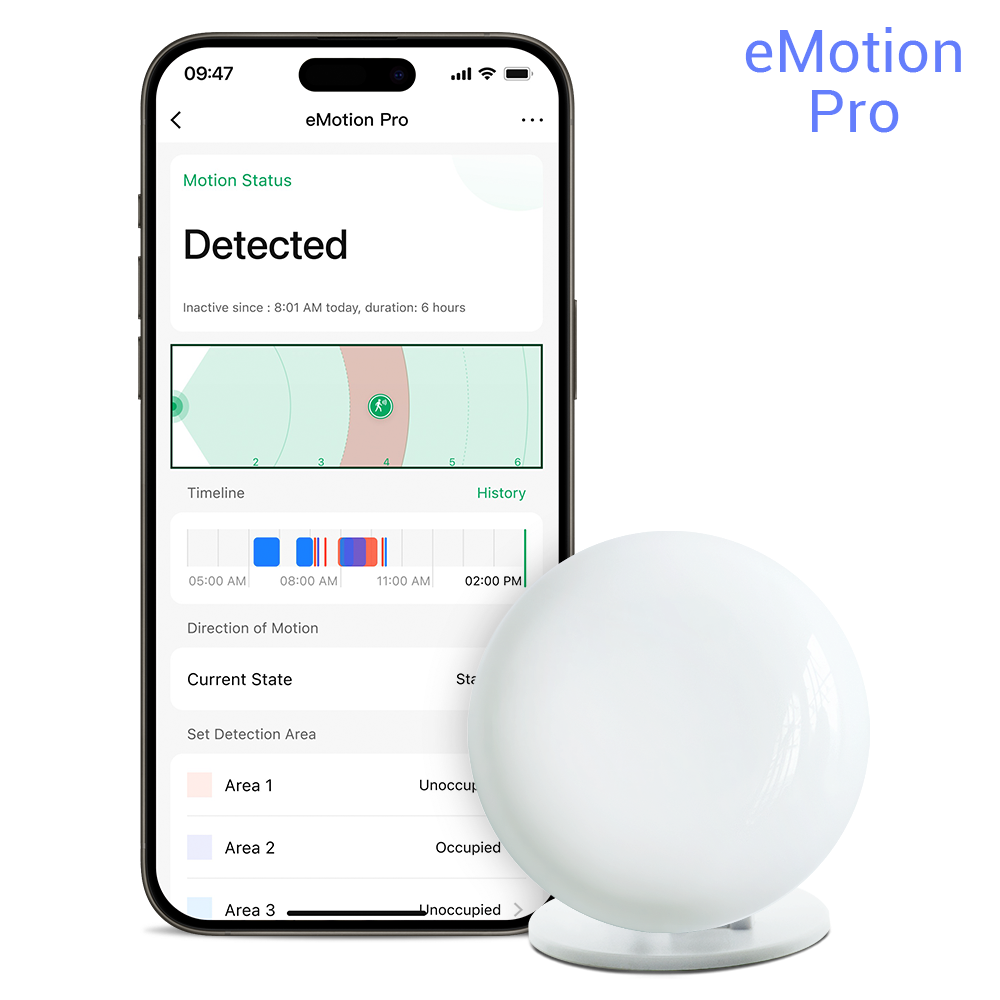
eMotion Pro is positioned as a 24GHz mmWave presence sensor for Home Assistant room automation. LinknLink product information describes a compact sensor with Wi-Fi, MQTT-oriented Home Assistant workflows, still-presence detection, a 5-6 m detection range, and automation use cases such as keeping lights, media, climate, or notifications aligned with real occupancy.
Compared with FP2, eMotion Pro is less about detailed multi-person spatial tracking and more about practical room actions. That makes it relevant when you want a presence signal to trigger a lamp, keep an AC scene active, or connect a room sensor to MQTT. If your Home Assistant setup already uses MQTT, an MQTT-friendly device may be easier to reason about than a device that enters Home Assistant through a bridge-style ecosystem path.
eMotion Pro may also be a better fit when appliance automation is part of the room plan. LinknLink product content positions the device around presence plus IR control and brightness sensing, although firmware availability and feature status should be checked on the live product page before purchase. In practical terms, this means eMotion Pro is most interesting in bedrooms, offices, or media rooms where presence, ambient light, and AC or TV control are part of the same automation story.
For users considering an aqara fp2 alternative, the important question is not whether eMotion Pro recreates every FP2 zone feature. It does not aim to be the same kind of product. The better question is whether you need precise zone mapping, or whether room-level presence plus MQTT and appliance automation is enough for your Home Assistant workflow.
Feature Comparison
Presence detection
Both sensors use mmWave radar to detect presence more reliably than a basic motion-only sensor. Aqara FP2 emphasizes ultra-high precision and slight movement detection. eMotion Pro emphasizes still-presence detection with a 24GHz radar sensor. In a bedroom or home office, either sensor may help reduce false “room empty” automations compared with PIR alone. Placement and tuning still matter, especially around fans, curtains, pets, and reflective surfaces.
Multi-zone detection
This is one of the clearest differences. FP2 is designed around zone positioning and multi-person room awareness. Aqara describes room coverage up to 40 m² and multiple configured zones. eMotion Pro includes zone indication, but LinknLink product information notes that users who need more accurate zone-based triggering may consider 60GHz presence sensors such as eMotion Ultra. If your automation depends on desk versus sofa versus doorway logic, FP2 may be the more suitable comparison point. If you mainly need “occupied or not occupied,” eMotion Pro may be enough depending on your needs.
Home Assistant integration
Aqara documents FP2 as compatible with Home Assistant through HomeKit Controller. That can work well, but it also means the integration path is shaped by how Home Assistant reads HomeKit-exposed entities. eMotion Pro is described around Motion2MQTT and MQTT service workflows, which may appeal to users who prefer explicit MQTT entities and automations. If you already run MQTT in Home Assistant, eMotion Pro may be a better fit for a direct local automation style. If you already rely on Apple Home or Aqara device flows, FP2 may be suitable.
MQTT support
MQTT is one of the reasons users compare eMotion Pro with Aqara FP2. eMotion Pro is positioned with MQTT support for Home Assistant. MQTT can make automations transparent because presence states are exposed as topics and entities that can be reused across dashboards, rules, and scripts. Aqara FP2 is commonly used in Home Assistant through HomeKit Controller rather than as a native MQTT device. For users who want MQTT as the main integration pattern, eMotion Pro may align more closely with that architecture.

IR automation
Aqara FP2 is not mainly an IR automation device. Its strength is room presence and spatial mapping. eMotion Pro is positioned by LinknLink around presence plus IR appliance control, with product content referencing AC, TV, and brightness-related automations. Because firmware features can change, users should verify the current IR and brightness status on the product page before buying. When available, integrated IR can reduce the need for a separate IR blaster in a bedroom, office, or media room.
Privacy
Both sensors can support privacy-friendly room automation because they do not rely on a camera. This is especially important in bedrooms, elder care rooms, and home offices. FP2 also supports fall detection in the Aqara ecosystem when ceiling placement requirements are met, according to Aqara documentation. eMotion Pro may be useful for elder care routines such as detecting room presence, inactivity patterns, or lighting needs, but it should not be described as a medical device unless the specific product documentation supports that use.
Installation
FP2 may require more zone setup and calibration, especially if you want fine room mapping. It supports flexible placement, including ceiling and vertical installation, and ceiling placement is required for its fall detection mode. eMotion Pro is closer to a room sensor setup: power it, connect it to Wi-Fi, expose it through the intended MQTT workflow, and build automations around presence. For users who like tuning zones, FP2 can be rewarding. For users who want a simpler MQTT room trigger, eMotion Pro may be easier to maintain.
Pricing
Pricing changes by market, promotions, bundles, and retailer. Aqara FP2 typically sits in a higher price band than many simple room-level sensors because it includes spatial positioning features. eMotion Pro is listed by LinknLink as a lower-cost room presence sensor at the time of preparation, with multi-pack options available. If your room requires zone mapping, the extra cost of FP2 may be reasonable. If you need several rooms covered with presence signals, eMotion Pro may be a better fit for budget planning depending on your needs.
Which Sensor Is Better For Home Assistant
The practical answer depends on how you define “better.” If you mean zone-aware positioning, Aqara FP2 may be suitable because its product design emphasizes room mapping and multi-person detection. If you mean MQTT-based Home Assistant automation, eMotion Pro may be a better fit because it is positioned around Motion2MQTT and local automation workflows. If you mean appliance control, eMotion Pro may be more relevant because IR automation is part of its product direction.
For Home Assistant users who want the least ambiguous device model, MQTT can be attractive. You can inspect topics, build automations, and combine presence with other entities. For Home Assistant users who already use HomeKit Controller devices, FP2 can fit naturally into an existing bridge-style setup. Neither approach is universally preferable. The better path depends on how your smart home is already organized.
Think about the room first. In a living room with several seating areas, FP2's zone model may help. In a bedroom with an AC, bedside light, and TV, eMotion Pro may be more relevant because the sensor can be part of a presence-and-appliance workflow. In a home office, either can work: FP2 if you want desk-zone logic, eMotion Pro if you want a simple occupied state that keeps lights and climate active while you work.
For users building a larger Home Assistant system, it is also reasonable to mix device types. You might use FP2 in one complex living room and use eMotion Pro in smaller rooms where room-level presence is enough. A presence sensor strategy does not need every room to use the same model.
Best Use Cases
Bedroom automation
eMotion Pro may be a better fit when the bedroom automation includes lights, AC, TV, or other IR appliances. A room-level occupied state can keep climate and night lighting active while someone is resting. FP2 may be suitable if you want bed-side versus doorway zones, but setup may require more calibration.
Home office
Both sensors can work in a home office. FP2 may be suitable if you want desk-zone detection or multiple zones in the same room. eMotion Pro may be suitable if your main goal is to keep lights, monitor scenes, or HVAC active while you sit still at a desk.
Living room
FP2 may be a better fit in larger living rooms where multiple zones matter. For example, sofa, media console, and doorway behavior can be separated. eMotion Pro may be suitable for simpler living rooms where one presence state can drive lighting, AC, or media scenes.
Elder care
Both devices avoid cameras, which can make them more comfortable in care contexts. FP2 documents fall detection with ceiling placement requirements. eMotion Pro may support routines such as room occupancy, inactivity awareness, and lighting automation, depending on how you configure Home Assistant.
FAQ
Is eMotion Pro an Aqara FP2 alternative?
eMotion Pro can be considered an Aqara FP2 alternative when your priority is room-level presence, MQTT workflows, and appliance automation rather than detailed spatial mapping. If you need multi-zone positioning and multi-person tracking, FP2 may still be the more relevant comparison point.
Does Aqara FP2 work with Home Assistant?
Aqara documents FP2 as exposed to Home Assistant through HomeKit Controller. In practice, that makes it attractive for users who already use HomeKit-style devices. Users should check current Home Assistant and Aqara documentation because entity behavior can change with firmware and integration updates.
Does eMotion Pro support MQTT?
LinknLink product information describes eMotion Pro with Motion2MQTT and MQTT-based Home Assistant workflows. That may be useful for users who want local automation entities that can be inspected and reused across Home Assistant dashboards, rules, and scripts.
Which one may fit a bedroom better?
For a bedroom with AC, TV, or lighting scenes, eMotion Pro may be a better fit depending on your needs because its product direction includes presence plus appliance automation. FP2 may be suitable when you need zone logic, such as bed area versus doorway area.
Which one may fit a large living room better?
Aqara FP2 may be suitable for a larger living room when you want multiple zones and more spatial awareness. eMotion Pro may still work if one room-level presence state is enough for your lighting, climate, or media automations.
Sources for Technical Specifications
- Aqara Presence Sensor FP2 official product page for zone positioning, multi-person detection, ecosystem support, light sensor, local automations, and fall detection placement notes.
- Home Assistant HomeKit Controller documentation for the integration path commonly used with HomeKit-exposed devices.
- LinknLink eMotion Pro product page for 24GHz radar, Wi-Fi, MQTT-oriented Home Assistant workflows, detection range, and product positioning around IR and brightness automation.
- LinknLink eMotion Ultra product page for 60GHz zone-focused context when users need more accurate zone-based triggering.
Final Recommendation
For users comparing aqara fp2 vs emotion pro, the most balanced recommendation is to choose based on automation style rather than brand preference. Aqara FP2 may be suitable when you need spatial zones, multi-person awareness, and ecosystem flexibility through HomeKit-style integrations. eMotion Pro may be a better fit when you want a compact home assistant presence sensor for MQTT workflows, room-level occupancy, and appliance-oriented automations.
If you are building one complex living room, FP2 deserves consideration. If you are equipping several rooms for presence, lighting, climate, and media control, eMotion Pro may be easier to scale depending on your needs and budget. For mixed homes, using FP2 where zones matter and eMotion Pro where room presence is enough can be a practical, neutral approach.